AI Talking Baby Podcast Generator
Which AI should I use for talking baby podcast videos?
Use Korpi's Generate Studio if you want to build the clip yourself on one canvas: a baby host image, a childlike voiceover and a video node that makes the baby say your line, up to 15 seconds per clip. If you want a separate lip-sync step or a built-in editor to assemble episodes, see the comparison below. Watch the example below to judge the result.
Design a baby podcast host, give it a line in a childlike voice, and get a clip where the baby says it into the mic.
A talking baby podcast video is a short clip where a baby sits behind a podcast microphone and delivers a line like a seasoned talk-show host. The joke is the contrast: a toddler in headphones with an adult opinion. Korpi AI makes these in Generate Studio, its open canvas for images, video and voice, rather than in a dedicated template. You build the clip from three nodes. An Image node holds the baby host: generate one from a prompt (the example on this page was made from a prompt describing a one-year-old in headphones in a cozy podcast studio) or upload your own picture. A Voiceover node turns your script into speech; the included voice model has dozens of voices, including a sweet, childlike one, and premium voice modes cost AI credits. A Video Generator node takes the image as its first frame and the voiceover as its voice. Write the exact line in the video node's prompt as well: the voiceover sets how the baby sounds, and the prompt fixes what it says. The canvas tells you if the selected video model cannot take audio and offers to switch, and each clip runs up to 15 seconds. The example clip on this page was made exactly this way on a test account, with this line: "Welcome back to Diaper Talk. Today's guest says naps are optional. Respectfully? That's a lie. Let's get into it." Each clip is one take of up to 15 seconds, so a longer episode is several clips cut together.
Comedy and meme creators who want a recurring baby host for TikTok, Reels and YouTube Shorts without filming anyone.
Updated
Talking baby podcast example made in Korpi Generate Studio
Why Korpi AI is the best AI for talking baby podcast videos
The whole clip is built on one canvas: the baby image, the voiceover and the talking video sit side by side and can be rerun one node at a time.
A connected voiceover gives the baby its voice, and the line in the video prompt sets the words, in clips of up to 15 seconds.
The canvas checks the wiring. If the selected video model has no audio input, it says so and offers to switch before anything is generated.
Reuse the same baby image as the first frame of every clip, so the host looks the same across a series of episodes.
The credit estimate is shown on the video node before you generate.
How to make talking baby podcast videos with AI
- 1
Make the baby host image
In a Generate Studio project, switch the prompt bar to Image and describe the host: a baby in headphones behind a podcast microphone, mouth clearly visible. Or upload your own picture.
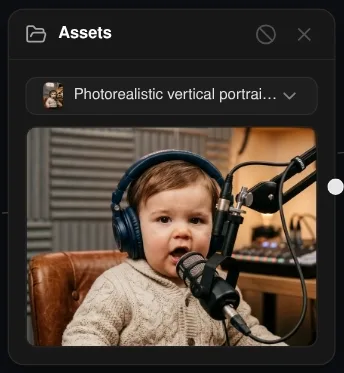
Step 1: the baby host image, generated in a Generate Studio project from a prompt. - 2
Write the line in a Voiceover node
Open the project canvas, double-click to add a Voiceover node, type the line and pick a voice preset. The example uses a childlike voice. Generate it and play it back before going on.
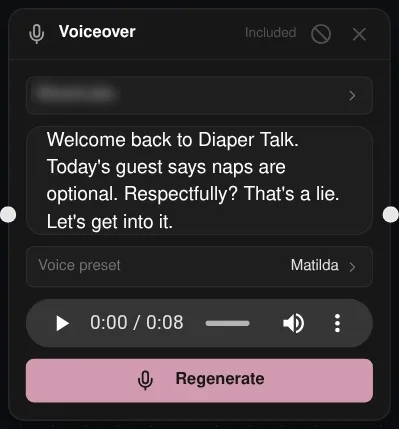
Step 2: the Voiceover node with the script, a childlike voice and the 8-second result. - 3
Connect the image and the voiceover to a video node
Add a Video Generator node and connect the image as the first frame and the voiceover as its voice. In the prompt, write the exact line in quotes plus a short direction, so the words match your script.
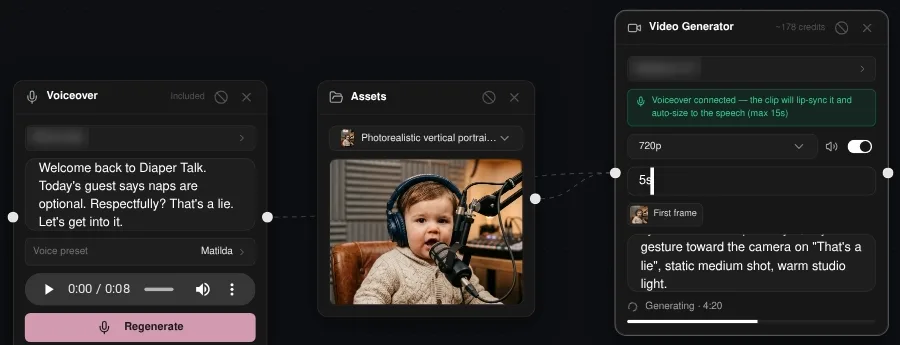
Step 3: the image and voiceover wired into the video node, with the line in its prompt. - 4
Generate and download the clip
Click Generate on the video node. The credit estimate is shown on the node first. When the clip is ready, play it on the canvas and download it from the project.
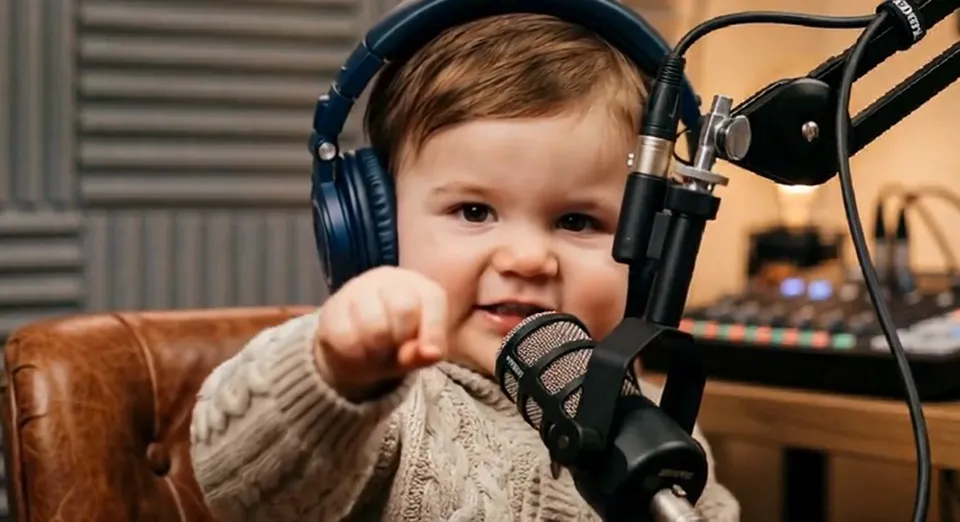
Step 4: a frame from the finished clip, where the baby says the Diaper Talk line.
Popular use cases
- Recurring baby-host comedy Shorts
- Hot-take and reaction clips
- Meme replies with a baby host
Example prompts
- Image: a chubby one-year-old in over-ear headphones and a knit sweater at a podcast microphone, serious talk-show face, cozy studio, ON AIR sign behind
- Line: "Welcome back to Diaper Talk. Today's guest says naps are optional. Respectfully? That's a lie. Let's get into it."
- Line: "Hot take: vegetables are a scam, and I have receipts."
- Line: "Let me stop you right there. The bottle was empty before I got here."
- Video direction: the baby speaks straight into the microphone, small head nods, raised eyebrows on the punchline, static medium shot
- Video direction: the baby leans back in the armchair and points at the camera on the last word
Korpi AI vs Morphic, BasedLabs, MindVideo
| Feature | Korpi AI | Morphicchecked | BasedLabschecked | MindVideochecked |
|---|---|---|---|---|
| Workflow | One canvas: image, voiceover and video nodes | Canvas with images, animation, voice and a separate Lip Sync step, assembled into an episode in ComposeWhere they win: Separate lip-sync step and a built-in episode editor | — | — |
| Clip length | Up to 15 seconds per talking clip | 30-second single takesWhere they win: Longer single take | — | — |
| Two hosts | One speaker per clip; cut clips together | Full two-host episodesWhere they win: Two-host episodes | — | — |
| Baby image | Generate from a prompt or upload | — | Upload a face and turn it into a baby, or generate from a prompt | — |
| Audio | Voiceover node from a script, or an uploaded audio file, as the voice | — | Type a script and pick a voice, or upload an audio file | Text-to-speech or uploaded audio, voices in many languages |
| Free use | Paid plan and AI credits | — | — | Free with enough credits; credits can be earned through check-ins and invitesWhere they win: Free credits |
Competitor facts come from each competitor's own page, checked on the date shown.
What it costs
Watching examples is free. Making and exporting your own AI Talking Baby Podcast video needs a paid plan, and AI generation uses credits. The AI credit cost is shown and confirmed before a render is charged; failed or cancelled renders are refunded.
- Hobby
- $16.99/month
- Clipper
- $27.99/month
- Pro
- $47.99/month
- Unlimited
- $149/month
Standard monthly prices in USD. See all plans
Guides
Frequently asked questions
What is the best AI for talking baby podcast videos?
Korpi AI makes them in Generate Studio: generate a baby host image, voice the line in a Voiceover node, and connect both to a video node with the line in its prompt, up to 15 seconds per clip. Morphic documents a separate lip-sync step, 30-second takes and two-host episodes assembled in its Compose editor.
How long can a talking baby clip be?
Up to 15 seconds per clip, so keep each line short. Longer episodes are several clips cut together.
Can I use my own baby photo?
You can upload any picture to the canvas and use it as the first frame. Only use photos you have the right to use, and avoid real children's faces without their guardians' consent.
Can I use my own voice recording?
You can connect an uploaded audio file to the video node instead of a generated voiceover, as the voice for the clip. Still write the exact line in the video prompt so the words match.
Is there a talking baby template?
No. Korpi has no dedicated talking baby niche; the clip is built from three nodes on the Generate Studio canvas, as shown in the steps above.
Is it free?
Watching the example is free. Making and exporting your own clip needs a paid Korpi plan, and video generation uses AI credits; the estimate is shown on the video node before you generate.
Start making talking baby podcast videos with Korpi AI
Design a baby podcast host, give it a line in a childlike voice, and get a clip where the baby says it into the mic.
Create your first video